
Complete.MD Connect1.1.2 - Google Play
You'll be able to see results in few seconds.
Publisher Description


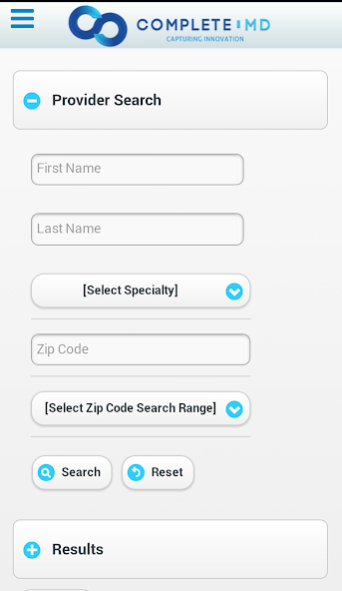

Connect powered by Complete.MD (www.complete.md) is your hand held medical assistant.
**Patients** Schedule appointments on the go!
**Providers** Connect directly with you patients and colleagues!
**Practice/System Managers** Enable your providers to work directly with patients and each other!
To Get Started:
- Just Download The Complete.MD App
- Click Get Started
How does this app help patients?
Patients can connect directly with their favorite physicians and providers through Complete.MD . Just open up the app, add or select your provider, and book an available appointment. No more calls, no more hold time, no more hassle!
How does this app help physicians, nurses, dentists, and other medical providers?
Any medical provider can offer their patients the ease of access to their calendar, reducing the need for staff to be a barrier to getting your appointments booked. Further, sending referrals to your favorite colleagues is done with the tap of your thumb. This technology works for you to allow you to quickly and easily schedule an appointment, send a referral to one of your friends, or pick up new patients all in the palm of your hand with Complete.MD.
Keywords: Complete MD CompleteMD Complete.MD Connect Anagen Systems
About Complete.MD Connect
The company that develops Complete.MD Connect is Anagen Systems. The latest version released by its developer is 1.1.2.
To install Complete.MD Connect on your Android device, just click the green Continue To App button above to start the installation process. The app is listed on our website since 2015-07-07 and was downloaded 0 times. We have already checked if the download link is safe, however for your own protection we recommend that you scan the downloaded app with your antivirus. Your antivirus may detect the Complete.MD Connect as malware as malware if the download link to com.complete.md.connect is broken.
How to install Complete.MD Connect on your Android device:
- Click on the Continue To App button on our website. This will redirect you to Google Play.
- Once the Complete.MD Connect is shown in the Google Play listing of your Android device, you can start its download and installation. Tap on the Install button located below the search bar and to the right of the app icon.
- A pop-up window with the permissions required by Complete.MD Connect will be shown. Click on Accept to continue the process.
- Complete.MD Connect will be downloaded onto your device, displaying a progress. Once the download completes, the installation will start and you'll get a notification after the installation is finished.
Program Details
System requirements
Download information
Pricing
Version History
version 1.1.2
posted on 2015-07-07
Version 1.1.2 - Fix for issue with Version Checking.
Version 1.1 - Added Notifications and Version Checking.
Version 1.0.6 - Added support for Maps.
Version 1.0.5 - Improved UI and bug fixes.
Version 1.0.4 - Improved animated graphics and corrected issues with viewing consent PDF
Version 1.0.3 - Added Geolocation and improved UI experience
Version 1.0.2 - Updates for Consent/Consultation video playback
Version 1.0.1 - Minor UI Tweaks
version 1.1.2
posted on 2015-07-07
Version 1.1.2 - Fix for issue with Version Checking.,Version 1.1 - Added Notifications and Version Checking.,Version 1.0.6 - Added support for Maps.,Version 1.0.5 - Improved UI and bug fixes.,Version 1.0.4 - Improved animated graphics and corrected issues with viewing consent PDF,Version 1.0.3 - Added Geolocation and improved UI experience,Version 1.0.2 - Updates for Consent/Consultation video playback,Version 1.0.1 - Minor UI Tweaks
Disclaimer
Official Google Play Link
We do not host Complete.MD Connect on our servers. We did not scan it for viruses, adware, spyware or other type of malware. This app is hosted by Google and passed their terms and conditions to be listed there. We recommend caution when installing it.
The Google Play link for Complete.MD Connect is provided to you by apps112.com without any warranties, representations or guarantees of any kind, so access it at your own risk.
If you have questions regarding this particular app contact the publisher directly. For questions about the functionalities of apps112.com contact us.
